…that doesn’t break the bank.
I have spent the last month or so seriously digging into LLM-driven workflows - tweaking my setup and getting more comfortable in the “software factory” development mindset. And since I started actively looking for work, I figured it’s the perfect opportunity to use the tools for something other than coding.
While I get as much LinkedIn job-postings spam as the next person, even with some preferences tweaking, it hardly shows the full picture of the offers available on the market. Even when frequently checking topical slack channels and some of the more approachable aggregators, a lot of interesting postings never really showed up on my radar.
I realised there’s nothing simpler than making pi do one more thing for me. As long as I can find a decent MCP with recently-scraped postings, getting some nicely pre-filtered and recent results should be trivial.
I found Fantastic Jobs on apify - it’s a simple API and MCP service that serves just that purpose. The interface is detailed enough that I can do some decent filtering on the API call level, and it costs around a cent per result - so very reasonable, assuming you’re not casting your net too wide.
The workflow I ended up with for now is pretty simple: Pi has the MCP server configured and a skill file describing how to use it best, based on some interactive experiments. On top of that I made a prompt template specific to my criteria and configured it using Nico Bailon’s pi-prompt-template-model to use a cheap but trustworthy model from one of my subscriptions.
The results are both presented in the chat history and written to my obsidian-based knowledgebase, where I usually have the agents store write-ups from some of the more involved debugging and research sessions. This way I have an easily readable and clickable interface that shows the pre-triaged results from a given time period.
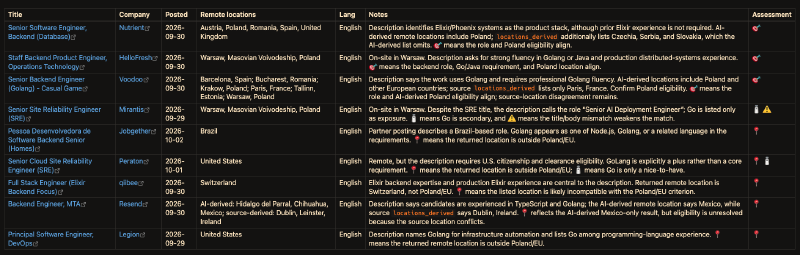
By default the whole is configured to compile results from two different searches, covering offers from the previous week, but the specifics can be overridden using the prompt parameters.
There isn’t much to the whole setup so anyone should be able to replicate it without much effort, but here’s my general setup with some of the quirks already documented:
MCP server configuration#
This uses pi’s new MCP functionality, but would be all the same with pi-mcp-adapter, except for maybe the codemode:
  // ~/.pi/agent/mcp.json
  "mcpServers": {
    "apify-job-listings": {
      "url": "https://mcp.apify.com/?tools=fetch-actor-details,fantastic-jobs/career-site-job-listing-api",
      "headers": {
        "Authorization": "Bearer ${APIFY_JOBS_PAT}"
      },
      "exposure": "codemode",
      "timeout": 180
    },
    ...
  }
I manage my keys using env vars and .envrc-priv files, untracked, but included from the relevant repos. The only challenge here was configuring the PAT scopes right - it seems like the system needed more permissions than I’d expect.
Skill and prompt template#
If we wanted to make this thing reusable for a number of unemployed folks, the skill would mainly contain information on how to use the MCP search well, and the prompt would say what exactly we’re searching for. In my case there’s a good amount of redundancy and mixed levels of abstraction, but I had better things to work on / optimize, especially considering how inexpensive the model running the prompt is.
So if you plan to set up a similar workflow yourself - “do as I say, not as I do” 😉. But you can use the technical information out of these so you don’t have to waste money running experiments on the API itself:
You’ll see that the prompt forces the agent to inject two skills into the context - one for using the MCP, another one for the standards to keep when authoring obsidian notes.
So while the system works, I’m still available for hire. If you’re looking for a backend developer with 10 years of experience to do some elixir/golang/devops work supported by a sensible AI workflow, feel free to get in touch