Table of Contents
Now that we have a way to get our music and our player(s) picked out, let’s come up with an easy to use workflow and an organisatonial structure that works for us. It’s going to be a lengthy one, so let’s just get started.
Here’s the gist of the workflow:
flowchart TD


cd((CDs))
cd-- dBPoweramp CD Ripper -->flac

bandcamp@{ shape: cloud }
bandcamp-->flac

subgraph TrueNas
  direction TD
  flac@{ shape: documents, label: "/flac_music" }
  opus@{ shape: documents, label: "/opus_music" }
  mp3@{ shape: documents, label: "/mp3_music" }
  plex@{ shape: "lin-rect", label: "PLEX server" }
  flac-. lossifier-opus .->opus
  flac-. lossifier-mp3 .->mp3
  flac===plex
end

rb@{ shape: card, label: "rockbox DAP"}
android@{ shape: card, label: "Android DAP"}
snow@{ shape: card, label: "snowsky DAP"}
laptop@{ shape: card, label: "laptop"}

opus-- rclone -->rb
mp3-- rclone -->snow
opus-. autosync .->android
plex-->laptop
plex-->android
flowchart TD

subgraph legend [Legend]
  direction TD
  style legend fill:none
  smb@{ shape: documents, label: "SMB share" }
  docker@{ shape: "lin-rect", label: "docker service" }
  dap@{ shape: card, label: "player hardware"}
  Com@{ shape: braces, label: "dotted arrows run\n on a schedule" }
end
As you can see the centerpiece of the system is a TrueNas NAS.
TrueNas
I became a big fan of those as soon as I set one up - it runs on any hardware, it’s trivial to set up, but at the same time it offers some advanced features, even in the free version.
The features we’ll care about the most here:
SMB shares
TrueNas lets you create network shares for your datasets and it helps you configure ACL for users and service accounts.
One of our SMB shares (marked with /flac_music) becomes the “source of truth” of our music collection - this is where we dump the music downloaded from bandcamp.
dBpoweramp CD Ripper has no issues ripping directly to a network share, which makes that workflow trivial (remember you’ll need to have the network share mounted first)
Running Docker services
TrueNas lets us run dokerized apps - both pre-packaged ones available in its built-in catalog and custom ones. As long as there’s a docker image published somewhere (even in a private repository), TrueNas should be able to run it.
That’s how we get the PLEX server for our plexamp - we just need to mount a volume with the flac music.

We can also use Docker to handle our music conversion.
Lossifier
I made lossifier - a handful of bash scripts in a trench coat Docker container that can help create and maintain a “lossy” version of a lossless FLAC music collection.
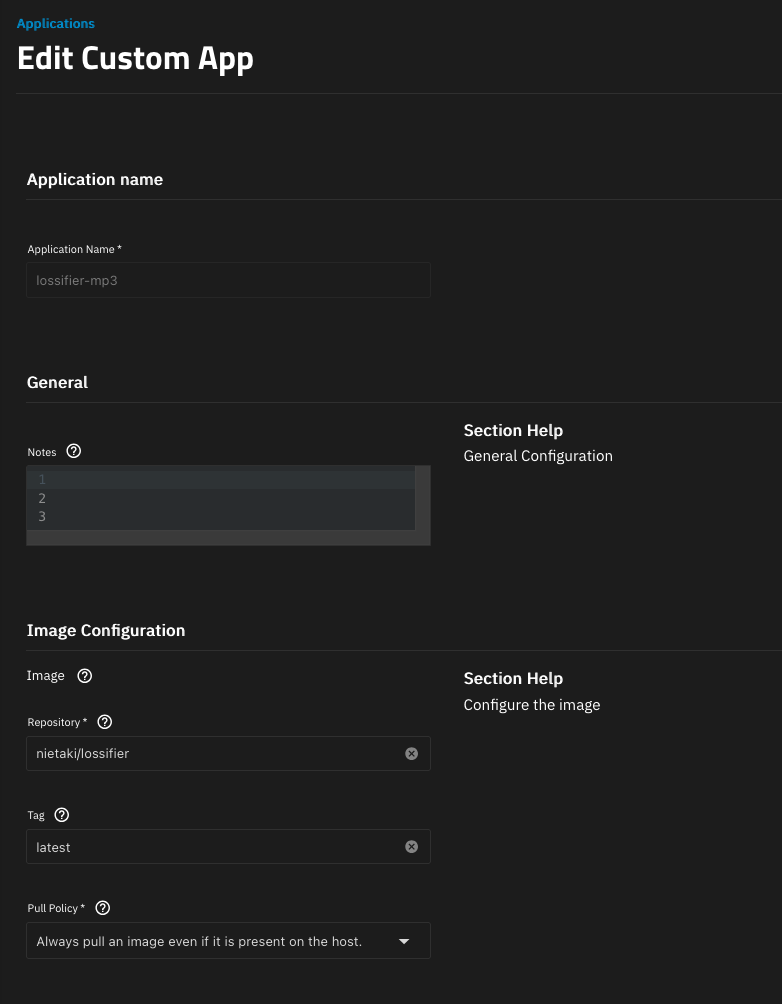
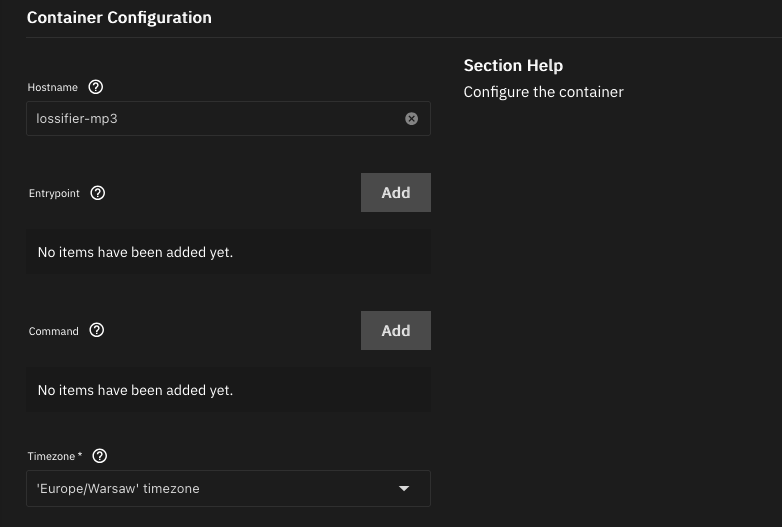
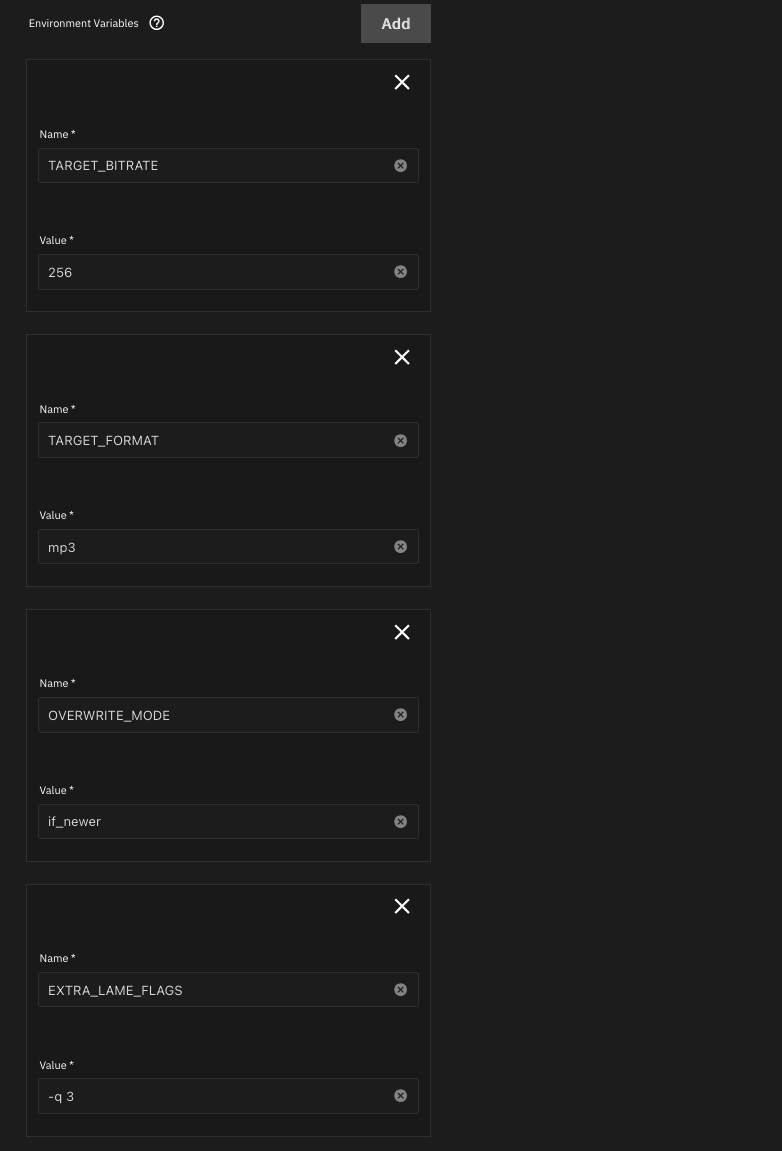
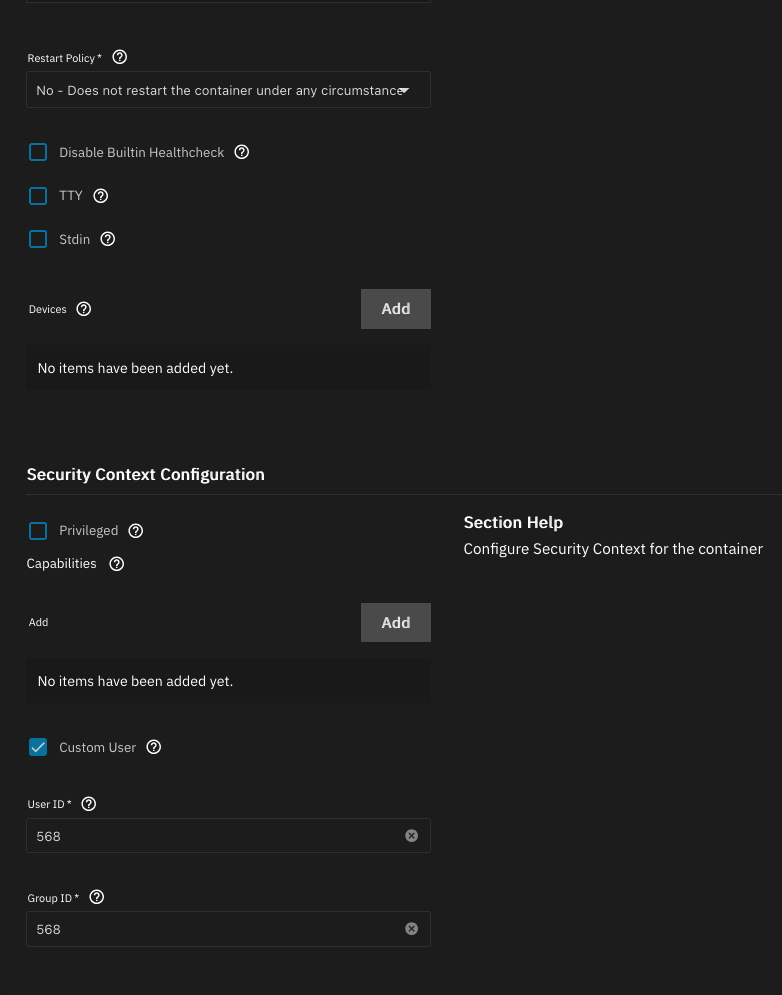
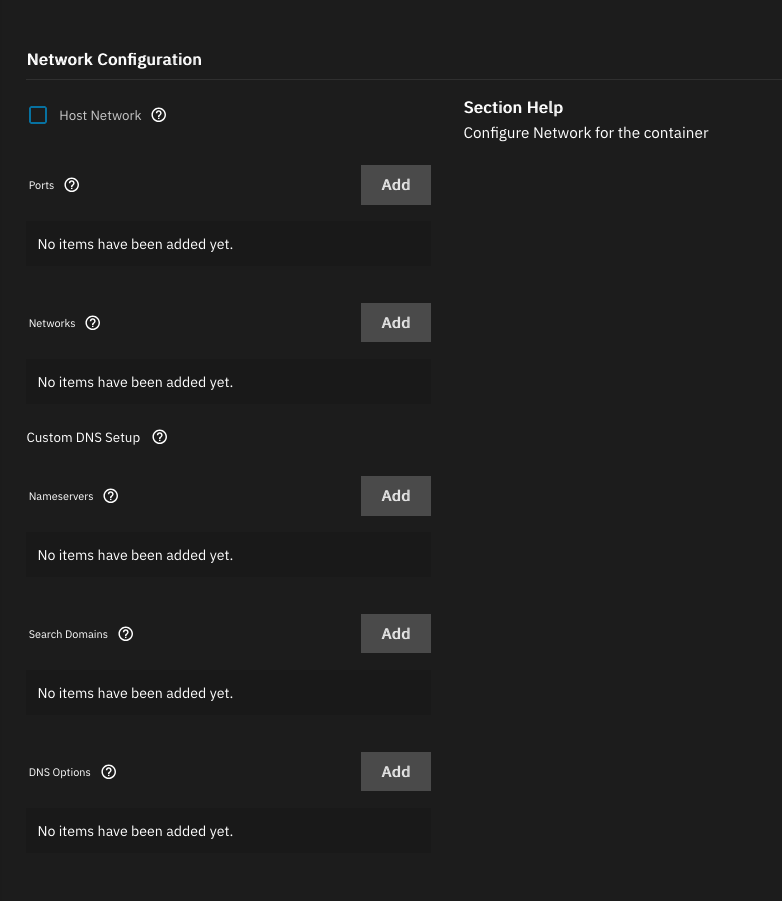
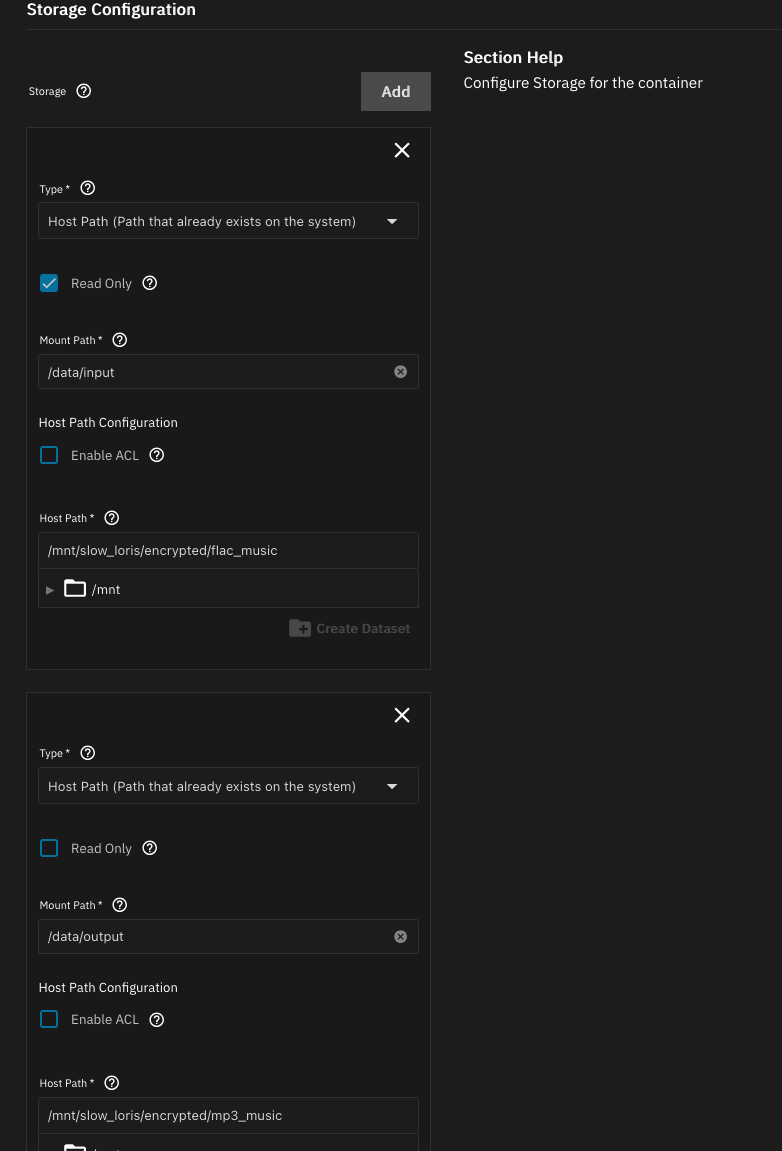
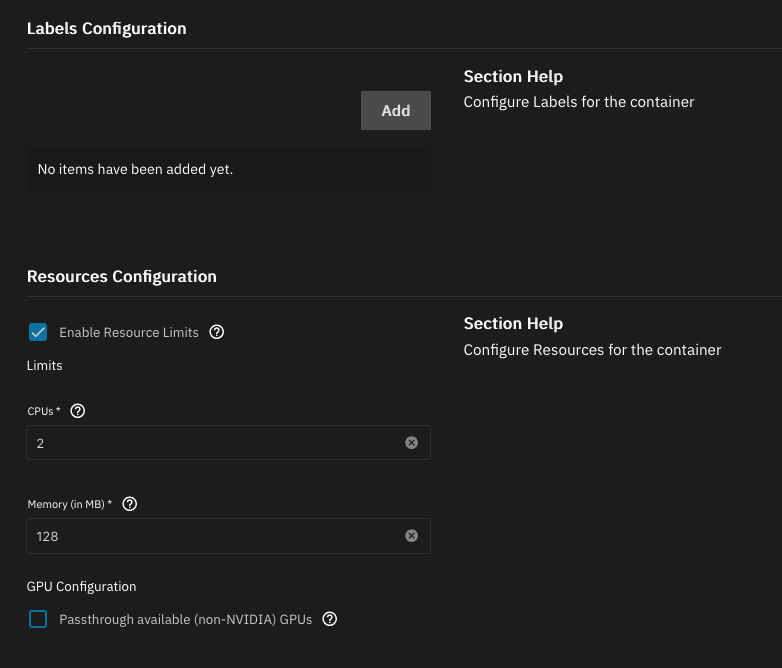
You can check out DockerHub and GitHub for more info on the project and its features, but what we need to do is create a deployment per target format in the TrueNAS UI - just go to Apps -> Discover Apps -> Custom App and configure it a bit like this:
Cron
The idea behind Lossifier is that you run it on a schedule, to keep the lossy collections in sync with your master collection. The initial run will take a while (let’s say 2h for every 1000 songs in the collection), but the subsequent runs should be quick - they just verify the state and address the updates.
We can use TrueNas’ built in cron tool to kick off a run every 15 minutes, for example. In the UI go to
System -> Advanced Settings -> Cron -> Add and add the schedule:
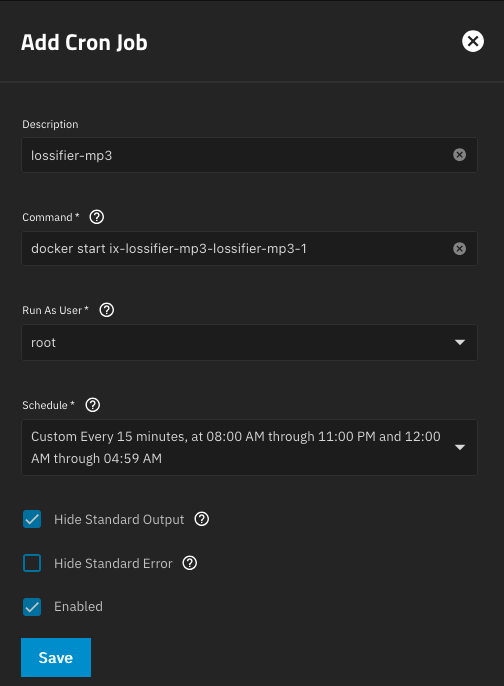
You might wonder how TrueNas derives the container name from its configuration - the result is pretty funky. I wonder as well and didn’t quite figure it out - the important thing is that you can check what it is and that it doesn’t seem to change over time - even if you update the image or its config:
$ sudo docker ps -a --format '{{.Image}} {{.Names}}'
nietaki/lossifier:latest ix-lossifier-mp3-lossifier-mp3-1
cloudflare/cloudflared:2026.2.0 ix-cloudflared-cloudflared-1
plexinc/pms-docker:plexpass ix-plex-plex-1
I personally run the opus conversion every 15 minutes - seems like a good balance between getting the music ready to put on your devices quickly and saving compute / making sure the runs don’t come close to overlapping in time. The mp3s I don’t care as much about, so they’re run less frequently.
With this working the techy part is basically done, let’s talk about music organisation.
Directory structure (to save your sanity)
Contrary to popular belief (of the /r/PleX subreddit) there is more than one sensible way of organising your music. The way I organise mine had the following goals:
- albums organised by
Album Artistto make it easy to navigate the directory structure (this part is not controversial) - dead-simple, platform agnostic playlist management
- compatibility with all the players I might want to use
The playlists part is the difficult one - Plex wants to do it for you even though it’s abysmal at it, Poweramp on Android does a good job but would be a huge pain to sync with your “source of truth”, similar thing with Rockbox. Creating your playlists in one of these tools and using them in the others is basically impossible.
So what I went for instead is organising the playlists as directories inside the FLAC source-of-truth dataset - if I want to add a song to a playlist I just copy it to the playlists directory.
This works for me because I don’t care much about the song order inside a playlist (so I guess they’re more like collections) or having the files duplicated inside my collection. As long as the players don’t pick them up when I’m listening to albums and don’t present duplicated tracks inside any given album.
Let’s see what it looks like in practice:
$ tree -d
.
├── Music
│   ├── Albums
│   │   ├── 6ix Toys
│   │   │   └── 6ix Toys
│   │   ├── Afro Kolektyw
│   │   │   └── Czarno Widzę
│   │   ├── Agnieszka Osiecka
│   │   │   ├── Sześć oceanów, piosenki 1962-2013 - CD1 - Ocean popielaty
│   │   │   ├── Sześć oceanów, piosenki 1962-2013 - CD2 - Ocean rozowy
│   │   │   ├── Sześć oceanów, piosenki 1962-2013 - CD3 - Ocean niespokojny
│   │   │   ├── Sześć oceanów, piosenki 1962-2013 - CD4 - Ocean burz
│   │   │   ├── Sześć oceanów, piosenki 1962-2013 - CD5 - Ocean granatowy
│   │   │   └── Sześć oceanów, piosenki 1962-2013 - CD6 - Ocean zielony
...
│   │   └── Łona I Webber
│   │       └── Cztery I Pół
│   ├── Playlists
│   │   ├── 00s MTV music
│   │   ├── 4x4 - Leading The Blind - soundtrack
│   │   ├── 5 a.m
│   │   ├── Liquid DnB subset
...
│   │   ├── sappy songs
│   │   └── ~ rockmetal
│   └── m3us # this contains .m3u playlist files for each of the /Music/Playlists/* directories
└── Playlists # this does as well
You’ll see that /Music/Playlists is separate from /Music/Albums and we have additional directories with
.m3u playlist files - the most widely supported standard around.
Those are generated by lossifier, if you configure it for that purpose.
The reason I have two directories with playlist files is for compatibility with different players.
Ancient Android standards expect music in /Music and playlist in /Playlists, so that works well for the
Android-based DAPs.
For some reason I don’t really remember anymore, in Rockbox it worked out better to have
the m3us directly inside /Music.
The way to handle the album/playlist separation in Plex is simple enough - create a “Library” for each - you can use
the “main” one in any way offered by plexamp, and in the Playlists one it’s usually best to browse by directories.
Synchronising music
If you already have your DAP(s) configured the way you like, the remaining puzzle-piece is keeping them synchronized with the library.
Dragging-and-dropping files from an SMB share is good and all, but even with lossy compression it’s easy to get your library to tens or even hundreds of Gigabytes. Even if your OS attempts to do some “clever” directory merging it can take a while.
On Android-based devices you can use something like Autosync. You can set it up so that it connects to a data source of your choice (probably SMB in our case, could be FTP, S3, pCloud, …) and pulls in the updates.
For regular players we can use rclone - basically a “cloud-aware” rsync (and what Autosync uses underneath its slick UX).
An example invocation I’d use:
$ rclone copy -v --size-only --checkers 2 --transfers 1 --exclude ".*" \
    --order-by 'name,ascending' --stats 20s --max-backlog 200000 \
    smb_share_name:/opus_music local:/Volumes/EROS512
The sync command is even more powerful than the copy one, but you do need to be more careful with it -
it’s easy to accidentally have it delete much more than the files no longer in your library. Like all the config files on your DAP for example 😁